
FileMaker WebDirect, FileMaker Cloud or a real web app: what's the difference?
"We don't need to migrate: our FileMaker is already on the web, with WebDirect." We hear this a lot, and it isn't wrong. FileMaker can indeed open an application in a browser with nothing to install. It also offers cloud hosting for your database, and a free app for iPhone and iPad. So why talk about a "real" web application?
Because all three make your FileMaker database reachable remotely, but none of them turns it into a web application. The difference shows up in day-to-day use: how many people can work at once, how it feels on a phone, how responsive it is, and above all the licensing model. Here is what each option really does, where it falls short, and when it is perfectly good enough.
In short
- WebDirect shows your FileMaker layouts in a browser; the FileMaker server computes every user's screen.
- FileMaker Cloud is Claris hosting your FileMaker server, not a new interface.
- FileMaker Go is the FileMaker app for iPhone and iPad, and only for them.
- All three are subject to per-user licences. A custom web application has none, and it is designed for the browser and mobile from the outset.
WebDirect: FileMaker in a browser
WebDirect comes with FileMaker Server and FileMaker Cloud. It lets you open an existing FileMaker application in a browser, on a computer or tablet, without installing FileMaker Pro. For the developer, it is very convenient: same layouts, same scripts, same file.
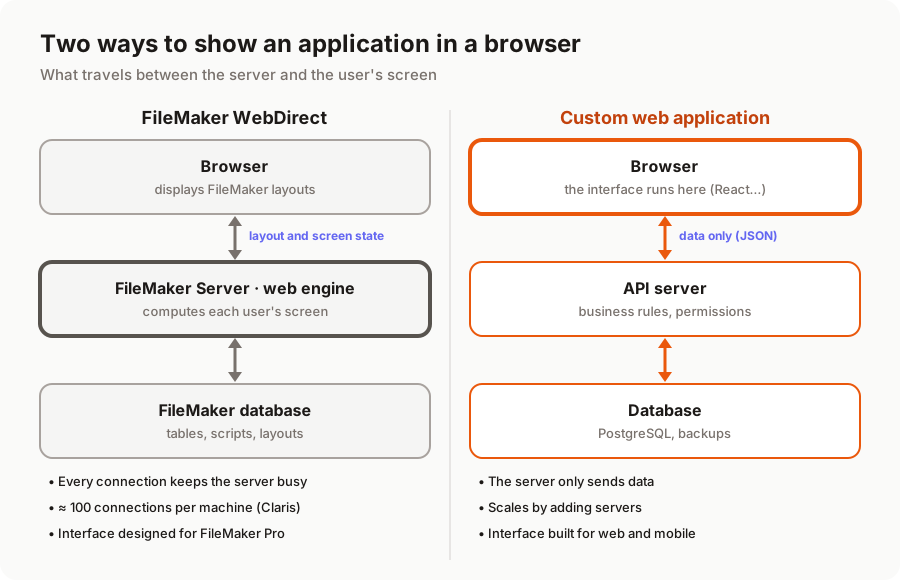
Under the hood, however, it works very differently from a typical website. With WebDirect, the FileMaker server computes the display: it keeps the state of every connected user's screen in memory and sends the browser what to draw. Every click, every tab change, every keystroke in a field means a round trip to the server.
This architecture has practical consequences.
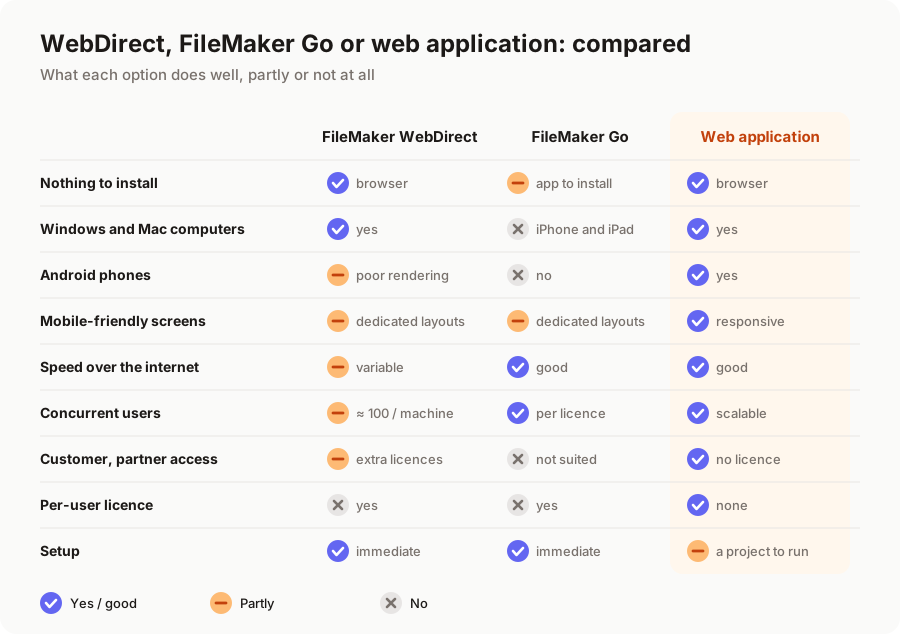
- Concurrent connections are limited. Claris states that, generally, up to 100 WebDirect connections per server machine are supported at a time, and that every browser window or tab counts as a separate connection (Claris documentation, "Maximum number of connections"). Beyond that, you need to add secondary machines to the deployment, which makes the infrastructure more complex.
- Responsiveness depends on the server and the network. On a good connection with few users, the experience is fine. On average 4G, with a busy layout or dozens of parallel sessions, response times get noticeably longer.
- Not every FileMaker Pro feature is available. Claris itself lists what is not supported: no Table View, some text formatting, auto-complete and conditional highlighting options missing, no gestures or animations (Claris documentation, "Understand the capabilities of FileMaker WebDirect"). Some script steps do not work in a browser either. A database built for FileMaker Pro therefore often needs reworking to run well under WebDirect.
- The rendering is not phone-friendly. FileMaker layouts have a fixed size designed for a computer screen. On a phone, users have to zoom and scroll, or you have to build and maintain dedicated mobile layouts.
FileMaker Cloud: hosting, not a new interface
FileMaker Cloud is often mistaken for a "web" version of FileMaker. In fact, it is FileMaker Server hosted and managed by Claris: no server to install, back up or update. It is a genuine service, useful for a business without in-house IT.
For your users, though, nothing changes: they still connect with FileMaker Pro, FileMaker Go or WebDirect, with the same screens and the same limits. FileMaker Cloud solves the hosting question, not the interface, mobile or licensing questions. It also gives you less configuration freedom than a server you manage yourself: before choosing it, check that the plug-ins and integrations your database relies on are supported.
FileMaker Go: mobile, the Apple way
FileMaker Go is Claris's free app for iPhone and iPad. It offers a smooth native experience, with access to the camera, barcode scanning and offline use if the database is designed for it. For a field team equipped with iPads, it is a very good solution.
Its limits are clear: it does not exist on Android, it has to be installed on every device, and every user needs a FileMaker licence to connect to a shared database. So it is not suited to opening your application to customers or partners.
What they have in common: per-user licences
WebDirect, FileMaker Go and FileMaker Pro are three ways into the same platform, and all three are covered by per-user FileMaker licences. Depending on the plan, expect roughly €200 to €500 (excl. VAT) per user per year, plus hosting and maintenance. Opening the database to 50 sales reps, temporary staff or your customers means buying that many more licences (or concurrent connections, depending on the contract). We break this down in our article on the true cost of FileMaker licences.
When WebDirect and FileMaker are enough
Let's be honest: in many cases, there is no reason to migrate. WebDirect and FileMaker Cloud do the job well if:
- you have few users (ten, maybe twenty) who mostly work in the office;
- web access is occasional: looking up a record while out, approving a request, entering a reading;
- your mobile staff have iPhones or iPads and can use FileMaker Go;
- you don't need to open the application to people outside the company;
- your database works well and the licence bill is still reasonable for you.
In that situation, a migration would not pay off. You are better off optimising your existing layouts for WebDirect.
What a real web application brings
A custom web application works differently: the interface runs in the user's browser, and the server simply provides the data and applies the business rules, through an API. In practice:
- Screens built for web and mobile. The same screen adapts automatically to a computer, a tablet, or an Android phone as well as an iPhone, with no layouts to duplicate.
- Simple scaling. The server only sends data, and adding a second one is enough if user numbers grow sharply.
- No per-user licence. You can open a portal to your customers or give access to subcontractors and seasonal staff without each account costing a licence.
- Modern integrations. The API that feeds your screens also connects your accounting, your online shop or your partners' tools.
- Standard technology. You own the code, it is written in widely used languages, and you will always find developers to evolve it.
The trade-off is that you have to run a project: understand your database, design the screens, develop, migrate the data. With AI-assisted development, that project is far more affordable than it was a few years ago: €5k to €12k for a small application, €12k to €30k for a business application, as we explain in how much a FileMaker migration costs.
A typical example
Take a 40-person maintenance company, with 25 field technicians using Android phones. The office uses FileMaker Pro; technicians check their jobs through WebDirect. In practice, the screens are too small, they have to zoom, writing up a report takes ages in areas with poor coverage, and every technician needs a licence.
This is where WebDirect reaches its limits. A web application designed for the phone, with only the screens a technician needs (today's schedule, job sheet, photos, customer signature), genuinely changes their day. It can even start with that single module while the office stays on FileMaker for the time being: that is the idea behind a phased migration.
In summary
WebDirect, FileMaker Cloud and FileMaker Go are good tools for making a FileMaker database available remotely to a small team. They do not turn it into a web application: the interface is still FileMaker's, concurrent connections are limited, mobile remains a compromise and every user costs a licence. When your needs go beyond that (many users, field staff on Android, customers to connect), a custom web application becomes the more solid choice. If you are still weighing it up, our article FileMaker or a custom web application: an honest comparison will help you decide.
Want to know whether WebDirect is enough for your needs? We offer a free audit of your FileMaker application, with a clear recommendation, including when the right answer is not to migrate. Discover our FileMaker migration service or tell us about your project.
A migration or business app project in mind?
Tell us about your context: we reply within 48 hours with a first recommendation, no strings attached.
Discuss your project