
FileMaker migration: big bang or phased approach?
Once you have decided to move away from FileMaker, a question of method comes up very quickly: should you switch everything over in one go, or migrate the application piece by piece? Both approaches exist, both have their advocates, and neither is right in every case. The right choice depends on the size of your database, how your teams use it, and how much risk your business can take on cutover day.
In this article we give an honest comparison of the "big bang" and the phased migration, explain how to choose, and then show how to run FileMaker and the new application side by side during the transition, which is the real technical challenge of the phased approach.
In short
- Big bang: a single cutover, a shorter and simpler project, but all the risk lands on one day. Ideal for small applications.
- Phased migration: several go-lives, module by module or team by team. Risk is spread and benefits arrive sooner, but you have a transition period to organise.
- Running both systems relies on three rules: reliable synchronisation, one source of truth per piece of data, and an end date set from day one.
The big bang: switching everything at once
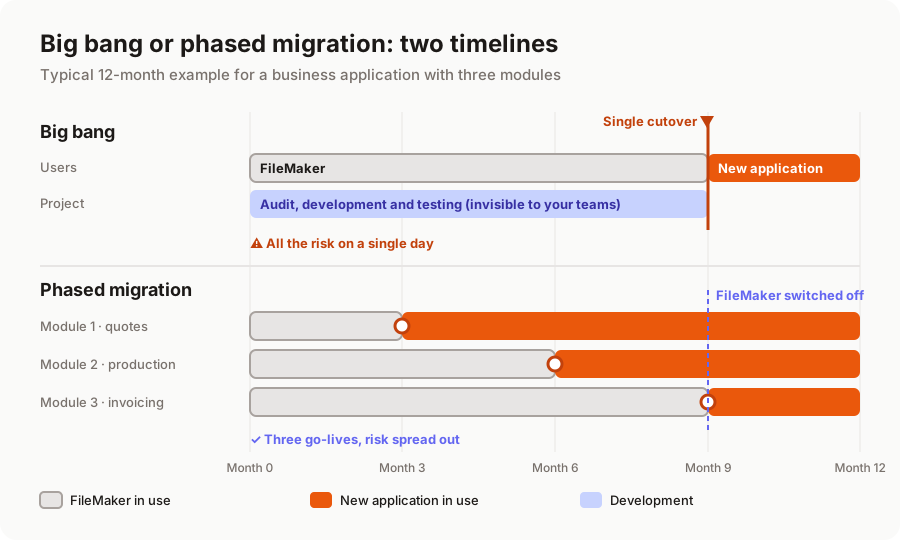
The idea is simple: you build the whole new application, test it, migrate the data, and on a given day, often a Monday morning after a weekend of data migration, everyone moves to the new tool. FileMaker is set to read-only, then switched off.
The benefits are real.
- No dual system: no synchronisation to build or monitor, no doubt about "where the right data lives".
- A shorter project, and therefore often slightly cheaper: all the effort goes into the new application.
- A clean break: teams know that from a given date, they work differently. No grey area.
So are the risks.
- Everything hinges on one day. A forgotten calculation, a misunderstood business rule, a failed import: the problem hits the whole company at once.
- A tunnel effect: for months, users see nothing. Feedback arrives late, when fixing things costs more.
- Training everyone at once: the whole company has to learn the new tool in the same week, while keeping the business running.
The phased migration: one module at a time
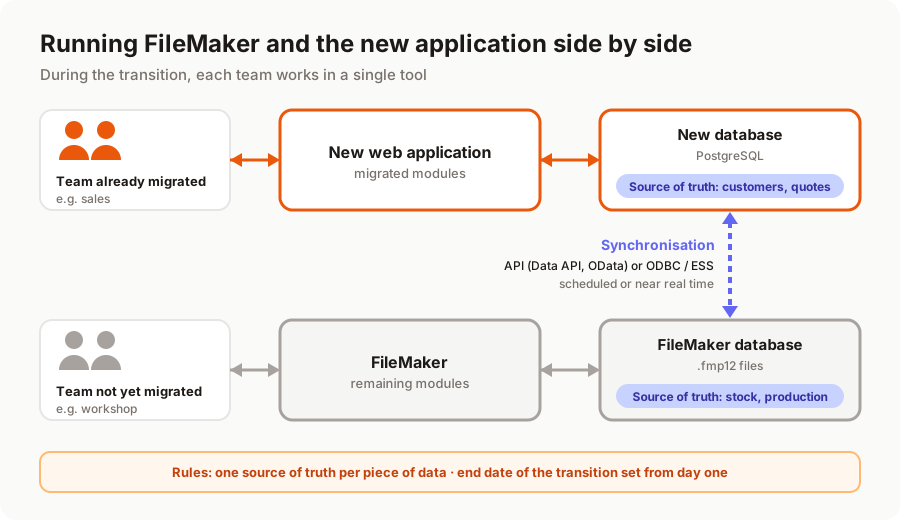
Here, the application is split into coherent pieces that go live one after another. During the transition, part of the business runs on the new application and the rest on FileMaker, with the two exchanging the data each one needs.
What you gain:
- Spread risk. Each go-live affects a limited scope. If something goes wrong, it is contained and quickly fixed.
- Earlier benefits. The module that hurts most (often the one you want on mobile or open to customers) can be live within weeks.
- Real feedback. Users of the first module shape the design of the next ones. The application gets better along the way.
- A staggered budget, paid as each part goes live.
What it costs:
- Running both systems requires dedicated development (the synchronisation), which will be thrown away once FileMaker is switched off. Expect anywhere from a few days to a few weeks of work, depending on how much data is shared.
- Temporary complexity: two tools, synchronisation rules to follow, extra care over data consistency.
- The risk of a never-ending transition. Without an end date, you can find yourself two years later paying for FileMaker licences and hosting for the new application.
How to choose
There is no formula, but here are a few rules of thumb from our projects.
A big bang is usually the right choice when:
- the application is small (fewer than 15 tables) and the project lasts a few weeks;
- the data is tightly interwoven: everything depends on everything, and splitting it would create more synchronisation than application;
- there are few users and they can all be trained together in half a day;
- there is a natural quiet period (summer shutdown, year end) to switch over calmly.
A phased migration is the better fit when:
- it is a core business or mission-critical application, with several modules and dozens of users;
- the business cannot stop, not even for a day;
- separate teams use separate parts of the database (sales, workshop, accounts);
- an urgent need justifies delivering one part quickly (a customer portal, a field app).
In practice, most of our business-application projects are phased, in two to four steps. For small applications, the big bang is often the most sensible option: running two systems would cost more than it saves. We walk through a full project in the 6 steps of a successful FileMaker migration.
Splitting it up: by module or by team?
A phased migration starts with how you split it. There are two approaches, often combined.
By functional module: quotes first, then orders and production, then invoicing. This is the most natural split when the modules are fairly independent. A good rule: start with a module that is visible and low-risk, one that delivers a quick win without touching the financial heart of the business.
By team or by site: one team (or one branch) moves entirely to the new application while the others stay on FileMaker. This works well when teams handle separate data, for example two branches each with their own customers. It is trickier when they share the same records.
Either way, the goal is the same: at any given time, each user works in a single tool for a given task. Asking someone to enter an order in the new application and then check stock in FileMaker is the surest way to get the project rejected.
Running FileMaker and the new application side by side
This is the technical part of the phased approach. The good news: FileMaker offers several standard ways to exchange data.
Ways to synchronise
- FileMaker Server APIs. The FileMaker Data API and the OData API let the new application read and write FileMaker data through standard web requests. This is the most common option for scheduled synchronisation (every five minutes, every hour) or event-driven updates. Check your licence terms as well, as they cap the volume of data exchanged through these APIs.
- ODBC / JDBC. FileMaker can be queried like a SQL database through an ODBC or JDBC driver. Handy for bulk reads, less so for frequent writes.
- ESS (External SQL Sources). In the other direction, FileMaker can display and edit tables from an external SQL database (SQL Server, MySQL, Oracle, among others) as if they were its own. It is an elegant option: the remaining FileMaker screens work directly in the new database, with no copy. You do need to check compatibility with your FileMaker version and the chosen database, and keep an eye on performance.
The right choice depends on volume, how fresh the data needs to be and your FileMaker version. For most small and mid-sized businesses, API synchronisation every few minutes is more than enough.
One source of truth per piece of data
This is the rule that prevents disasters. For each type of data (customers, products, orders, stock), you decide which tool owns it during the transition. Customers and quotes are created and edited in the new application; FileMaker receives a read-only copy. Stock stays in FileMaker until that module has moved; the new application reads it.
What you must avoid at all costs is the same customer record being editable on both sides. Synchronisation conflicts (who is right when two people changed the same address?) are the main cause of corrupted data in poorly prepared migrations. This ties in with FileMaker data migration, which needs to be planned from the very start of the project.
An end date, set from day one
Running both systems is scaffolding: useful during the works, it has to come down afterwards. At kick-off, set the date when FileMaker will be switched off, for instance no later than twelve months after the first go-live, and track it as a project milestone. Every extra month means another month of FileMaker licences, synchronisation to maintain and double vigilance. It is also when the financial payback of the migration really starts, as we explain in how much a FileMaker migration costs.
A typical example
Take a 25-person wholesale business with a FileMaker database of around thirty tables: quotes, orders, stock, invoicing. The sales team wants access to quotes from their phones; the warehouse and accounts are happy with what they have.
A sensible split would be: step 1, customers and quotes, available on mobile, live after two months; synchronisation copies customers and accepted quotes into FileMaker, where orders are still processed. Step 2, orders and stock, two to three months later. Step 3, invoicing and the accounting export, then FileMaker is switched off. Overall, a business-application project in the €12k to €30k range, spread over the year, with a first visible benefit in month two.
With AI-assisted development, each step moves much faster than it did a few years ago, which makes splitting the project even more attractive: go-lives come closer together and the transition period gets shorter. AI does not, however, decide how to split the project or define the synchronisation rules: those are business decisions, and we make them with you.
In summary
A big bang is simple and effective for a small application with tightly linked data. A phased migration is the safer choice for a business application used by several teams, provided it is properly framed: a split where each user works in a single tool, reliable synchronisation, one source of truth per piece of data, and an end date that is kept.
Not sure which approach suits your database? Our free audit of your FileMaker application includes a proposed split and a migration timeline. Discover our FileMaker migration service or tell us about your project.
A migration or business app project in mind?
Tell us about your context: we reply within 48 hours with a first recommendation, no strings attached.
Discuss your project