
FileMaker or a custom web application: an honest comparison
"Should we move away from FileMaker?" We hear that question every week, and we know it is often put to people who have every reason to say yes. We build custom web applications, so we are not neutral. But we have also seen migrations that should never have happened, and we would rather tell you before than after.
So here is a point-by-point comparison: what FileMaker does well, what it does less well, and the situations where it remains the best choice.
In short
- FileMaker is still unbeatable for quickly building an internal tool used by a small office-based team.
- A custom web application wins as soon as you need mobile access, integrations, access for customers or partners, or more than fifteen or so users.
- On cost, the number of users is what matters: under 10, the gap is small; above 20, licences weigh heavily.
The big picture
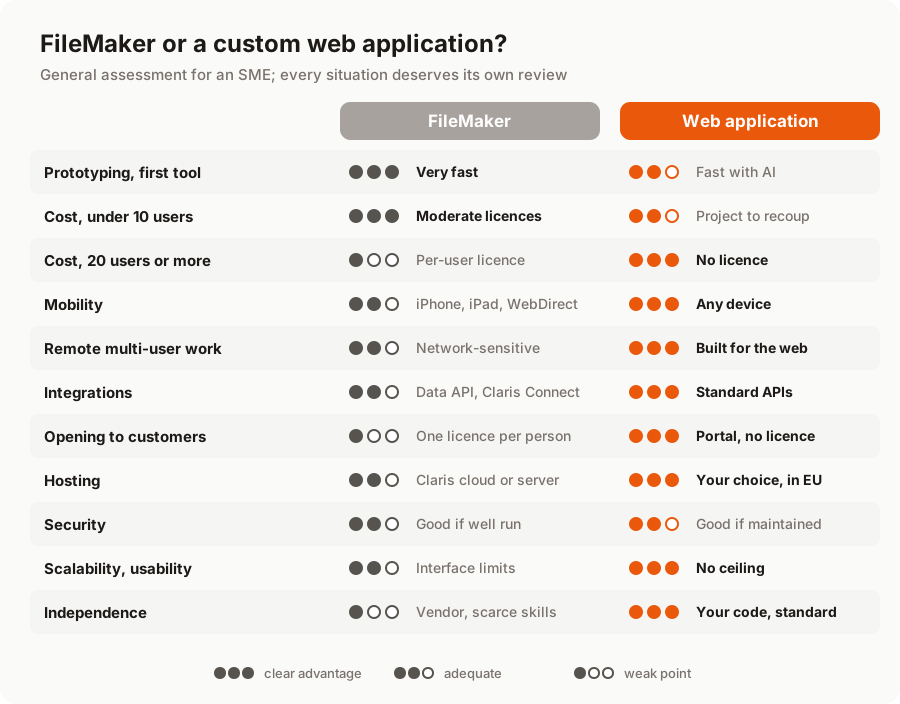
Let's go through the points that matter most to a business owner.
Cost: it all depends on the number of users
The two models are opposites. FileMaker is a subscription paid per user per year: roughly €200 to €500 (excl. VAT) depending on the plan, plus the server, hosting and maintenance by a FileMaker developer. The entry cost is low, but it grows with your team and comes back every year.
A custom web application requires an upfront investment (the project), followed by modest running costs: hosting and maintenance, around 10 to 15% of the project cost per year. The number of users makes almost no difference to the bill.
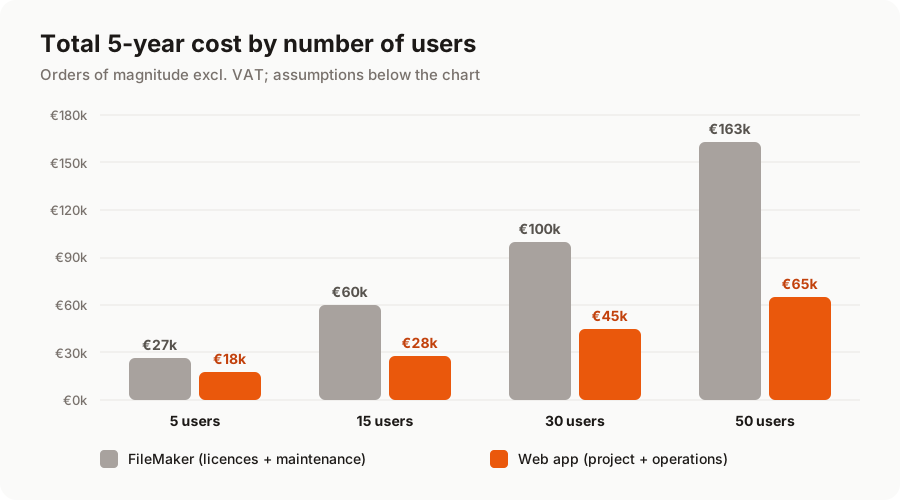
Two important caveats. First, with 5 users the gap is narrow: an entry-level FileMaker plan (roughly half the price of the one in the chart) brings the 5-year cost down to around €20k, and if your application is complex, the migration project may cost more than the licences you save. Second, a project's cost depends on the application's complexity, not on the number of users: our assumptions take it that an application used by 50 people is richer than one used by a team of 5. For a detailed calculation by company size, see our article on the real cost of FileMaker licences.
Mobility and remote work
This is often the first sticking point. FileMaker offers three ways into a database: the FileMaker Pro software installed on a computer, the FileMaker Go app on iPhone and iPad, and WebDirect in a browser. That covers a lot of ground, but with limits: no Android app, layouts designed for computers that adapt poorly to phones, and sensitivity to network quality as soon as people work remotely.
A web application is designed for the browser from day one, on every device. Screens are built for each format, and remote multi-user work is simply how it operates. A clear win for the web application, especially if you have field teams or people working from home.
Integrations and opening up to the outside world
FileMaker is not a closed box: the Data API, ODBC and Claris Connect let it exchange data with other software. But these connections remain specific to the Claris ecosystem, and Claris Connect limits the number of flows depending on your plan.
A web application is built around standard APIs. Connecting to accounting software, a CRM, an online shop or a payment service is part of the project. Above all, it can open up to your customers and partners (portal, extranet, online ordering) without a licence per person, which is hard to contemplate with FileMaker beyond a handful of accounts.
Hosting and security
With FileMaker, you can choose between FileMaker Cloud, hosted by Claris, and FileMaker Server, installed on your own machine or with a specialist host. Both can be secure: encryption, scheduled backups, secure connections. It all depends on how they are configured and monitored.
Exactly the same goes for a web application: it is only secure if it is well designed and well maintained. Its advantage lies elsewhere: you freely choose the host and the country (in Europe, for GDPR), and you benefit from standard web practices (role-based permissions, change history, strong authentication). On security, it is a draw: what makes the difference is the quality of operations, not the technology.
Scalability and lock-in
FileMaker handles large databases, but the user experience remains FileMaker's: it is hard to deliver the feel of a modern application, and some changes (a public portal, an Android app, large numbers of simultaneous users) run into the platform's limits.
The other issue is dependency. With FileMaker, you depend on a vendor (Claris, an Apple subsidiary), its pricing and product decisions, as well as on FileMaker developers, who are increasingly hard to find. A custom web application runs on open technologies, the code belongs to you, and any competent web team can take it over.
Prototyping: FileMaker's historic strength
Let's be fair: for building a first tool in a few days, FileMaker is remarkable. A motivated manager or employee can single-handedly build a working database, with screens, lists and printouts. That is precisely why so many SMEs started with it.
The gap has narrowed, though. With AI-assisted development, a small web application now takes 2 to 4 weeks for €5k to €12k, and a business application 1 to 3 months for €12k to €30k. It is no longer the six-month undertaking people pictured a few years ago. The details are in our article how much does a FileMaker to web migration cost?.
When FileMaker is still the right choice
We will advise you to keep FileMaker if most of these conditions are met:
- fewer than 10 users, mostly working in the office on Mac or PC;
- no mobile needs, or teams already equipped with iPhones and iPads;
- little data exchange with other software, and no need to open the tool to outsiders;
- a well-kept database, and someone available and reliable to keep it evolving;
- an internal tool that does not set your business apart from its competitors.
In that case, migrating would cost more than it would bring in. You are better off investing in cleaning up the database, documenting it and setting up backups properly.
When a web application is the obvious choice
Conversely, a custom web application becomes the logical choice if you tick several of these boxes:
- more than 15 to 20 users, or a growing team;
- staff in the field, working from home, or using Android phones;
- customers, suppliers or partners who need access;
- re-keying between FileMaker and your other tools;
- heavy reliance on a single person to keep the database running.
Still undecided? Our article on the 7 signs it's time to migrate includes a self-assessment grid to help you take stock.
In summary
FileMaker is not a bad tool: it is an excellent tool for getting started, which reaches its limits as a business grows, goes mobile and opens up to the outside world. A custom web application requires an upfront investment, but it removes per-seat licences, works everywhere and makes you independent.
The only way to decide for your case is to look at your database. We offer a free audit of your FileMaker application, with a clear recommendation, including when it is better to change nothing. Discover our FileMaker migration service or tell us about your project.
A migration or business app project in mind?
Tell us about your context: we reply within 48 hours with a first recommendation, no strings attached.
Discuss your project