
How much does a FileMaker to web migration cost?
It is the first question business owners ask when they consider leaving FileMaker, and the most legitimate one: how much will it cost? The honest answer fits in one sentence: from a few thousand euros for a small database to a few tens of thousands for a mission-critical application used across the whole company. If you had a project quoted three or four years ago, these amounts may come as a surprise: AI-assisted development has cut both timelines and budgets. But a range is useless unless you understand what moves it.
In this article, we break down the orders of magnitude we see in practice, the factors that really weigh on the budget and, above all, the calculation that matters: the cost of the migration compared with what FileMaker already costs you every year.
In short
- Small application (under 15 tables): €5k to €12k, in 2 to 4 weeks.
- Business application (15 to 50 tables): €12k to €30k, in 1 to 3 months.
- Mission-critical application (50+ tables, integrations, mobile): €30k to €60k and up, in 3 to 5 months.
- Beyond twenty or so users, the migration usually pays for itself in under 2 years, thanks to the end of per-seat licences.
Three project profiles
No two FileMaker databases are alike, but most projects fall into one of these three categories.
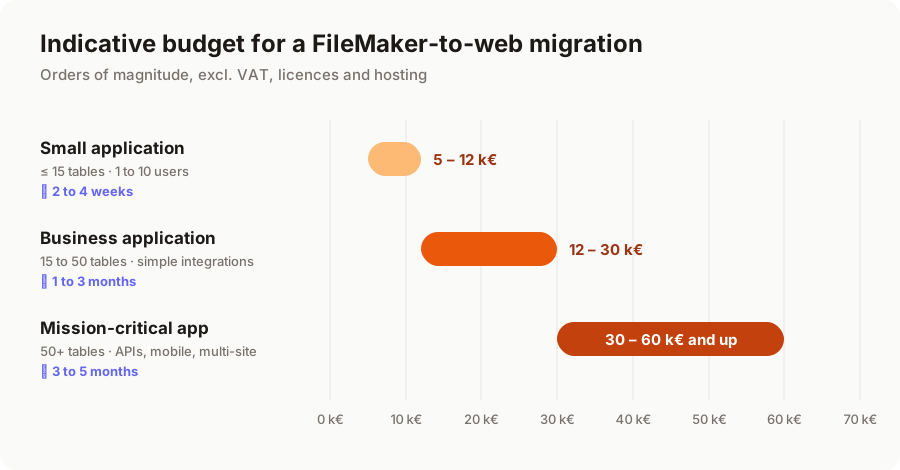
The small application: a customer tracking, inventory or scheduling database used by a handful of people. Few scripts, little or no data exchange with other software. It is the ideal case for a first migration: the scope is clear and the benefits show quickly.
The business application: the core of the company. Quotes, orders, invoicing, production tracking… It has grown layer by layer over the years, with dozens of scripts and a few imports/exports to accounting or an e-commerce site.
The mission-critical application: used across several sites, connected to an ERP and partner APIs, with field users on mobile and fine-grained permissions. Here, the migration is a genuine transformation project, carried out in stages.
What AI has changed
Not long ago, migrating a business application meant six months of development and a six-figure budget. That is no longer the case. We develop with AI assistants that produce most of the repetitive code: data entry screens, lists, forms, APIs, data migration scripts, automated tests. They also help read and document existing FileMaker scripts, which speeds up the audit.
In practice, development time is cut by a factor of two to three. What AI does not replace, however:
- understanding your business and the rules hidden in the database, often known to a single person;
- deciding what should be simplified, kept or dropped;
- checking that every calculation gives the same result as before, and that migrated data is correct;
- supporting your teams through the switchover.
That is now where the value of a migration project lies, and a larger share of the budget.
The 6 factors that drive the price
The number of tables gives a first idea, but it is not the only criterion. Here is what we look at during an audit.
- Business logic hidden in scripts. A 300-line FileMaker script that calculates a price, generates a PDF and sends an email often represents more work than a dozen simple tables. It is the main source of uncertainty, and the reason we always start with an audit.
- Integrations. Every connection to another tool (accounting, CRM, e-commerce, a carrier's API) adds development and testing.
- Data volume and quality. Duplicates, fields used in creative ways, containers full of PDFs and images: data migration can account for around 15% of the budget.
- Users and permissions. Three people who see everything, or fifty users split into profiles with different access rights: the difference in complexity is real.
- Mobile needs. A responsive web interface is enough in most cases. A native mobile app with offline mode is a project in its own right.
- User experience ambitions. Reproducing FileMaker screens one-to-one costs less up front, but it is rarely the right choice: the migration is the opportunity to simplify the workflows that waste your team's time.
Where does the budget go?
With AI, development is no longer the main cost it used to be. A well-run project now devotes most of the budget to understanding the existing system, designing, and securing the switchover.
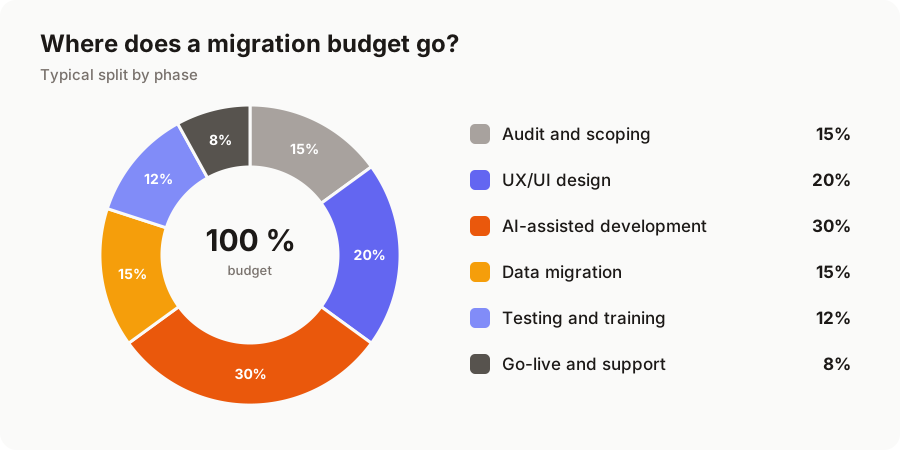
The phases you might be tempted to trim, auditing and testing, are precisely the ones that prevent bad surprises. A thorough audit leads to an accurate quote; rushed testing is paid for at go-live, when teams discover that an edge case was forgotten.
The real calculation: compare with what FileMaker already costs you
A migration should be judged over time, not on the quote alone. FileMaker now runs on subscriptions: depending on the plan, expect roughly €200 to €500 (excl. VAT) per user per year in licences, plus the server, its hosting and maintenance. A custom web application has no per-seat licence: you pay for the project once, then for hosting and maintenance.
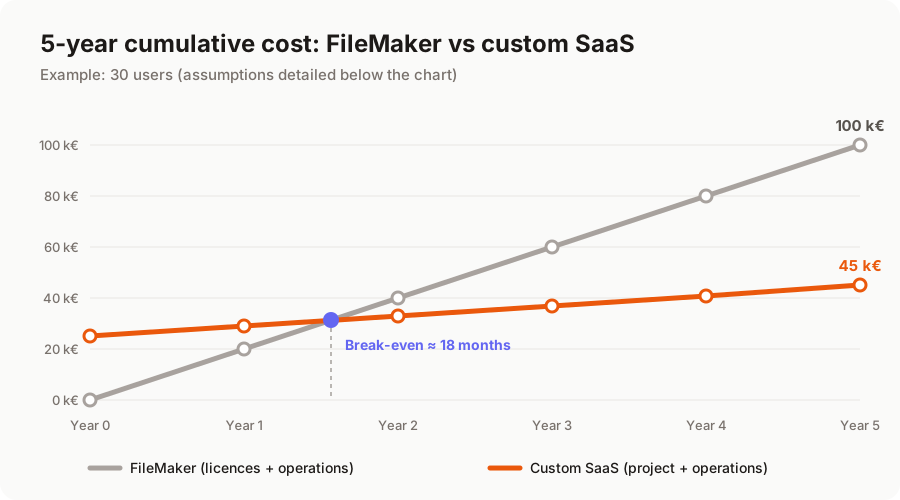
In this example, the migration pays for itself in a year and a half, then saves around €16k per year. The calculation obviously depends on your situation, and we should be honest: with fewer than 10 users, payback takes longer, around 2 to 3 years. Other benefits then often tip the balance:
- access from any browser, on computer, tablet or phone, with nothing to install;
- opening up to customers or partners (portal, extranet) without buying extra licences;
- modern API integrations with your other tools;
- code you own, built on standard technology for which developers are easy to find;
- no more dependence on the one person who "knows the database".
How to keep the bill under control
A few levers can significantly reduce the budget without sacrificing quality.
- Clean up before migrating. Some tables, scripts and reports are no longer used. Identifying them during the audit means less development.
- Migrate in stages. Rather than a "big bang", start with the module that delivers the most value while FileMaker keeps running for the rest. The budget is spread out and the risk reduced.
- Start with a simple foundation. A first version that covers 80% of daily use, then improvements based on real user feedback.
- Automate data migration. A migration script tested several times before the switchover avoids re-keying data and sleepless nights on D-day.
And after go-live?
Plan for two recurring costs, nowhere near the cost of licences:
- hosting on a European server: from a few tens to a few hundred euros per month, depending on the number of users and data volume;
- maintenance (security updates, backups, fixes): usually 10 to 15% of the project cost per year, plus any improvements you decide to make.
Summary
The cost of migrating FileMaker to the web depends less on the number of tables than on business logic, integrations and the state of your data. The right approach is to start with an audit, compare the project with the total cost of FileMaker over several years, and move forward in stages.
Want to know where your database stands? We offer a free audit of your FileMaker application, with a quote and a migration plan. Discover our FileMaker migration offer or tell us about your project.
A migration or business app project in mind?
Tell us about your context: we reply within 48 hours with a first recommendation, no strings attached.
Discuss your project