
Migrating FileMaker to the web: the 6 steps of a successful project
Leaving FileMaker is often more worrying than it is expensive. Your application has been running the business for years, it holds rules nobody ever wrote down anywhere else, and the idea of a "big switchover" is daunting. That is perfectly normal. Yet a successful migration is not a leap into the unknown: it is a sequence of well-understood steps, each with a clear goal, a deliverable you sign off on, and risks we know how to handle.
Here are the six steps we follow at Coladia to migrate a FileMaker application to a custom web application. For each one: what we do, what we need from you, the typical duration for a business application, the deliverable, and the pitfall to avoid.
In short
- Six steps: audit, design, development, data migration, testing, go-live and training.
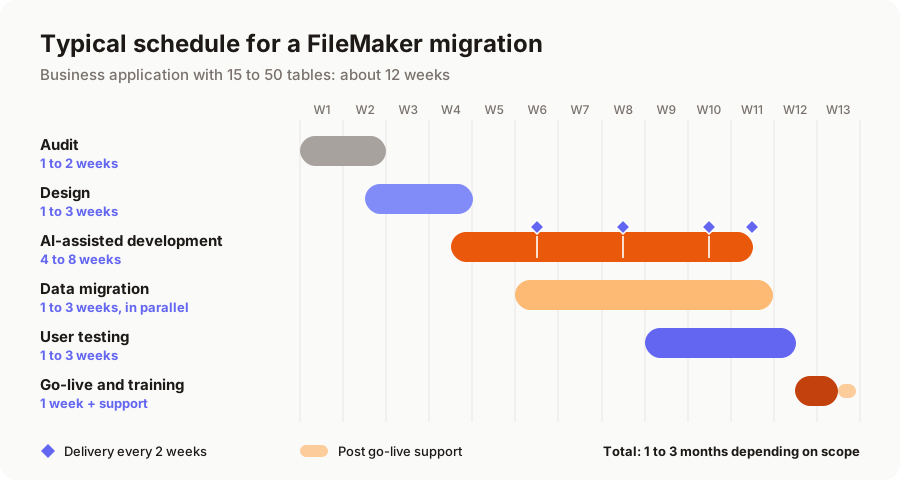
- For a business application (15 to 50 tables), expect 1 to 3 months in total, with a new delivery every two weeks.
- Your FileMaker system keeps running throughout the project: the switchover happens in a short window.
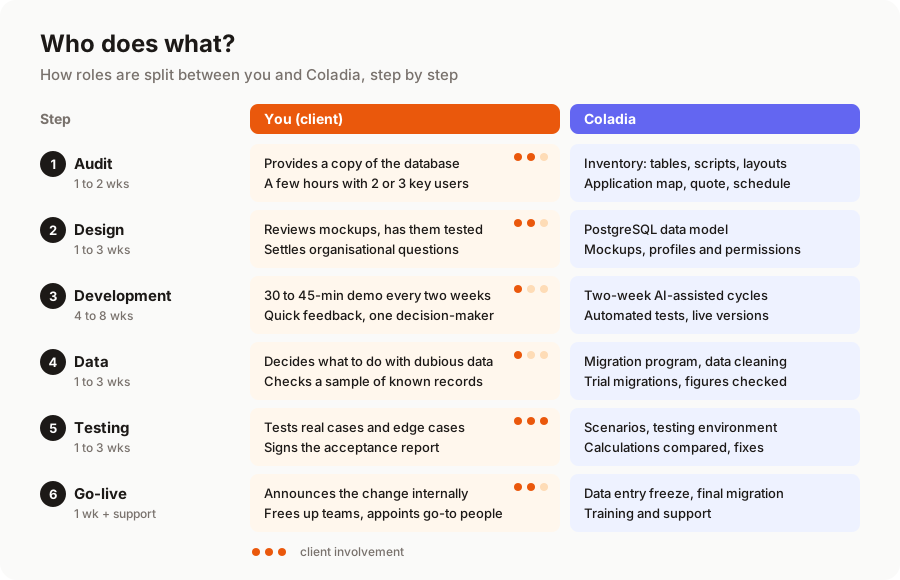
- Your involvement is concentrated in three moments: the audit, approving the mockups, and user testing.
Step 1: auditing the existing system
Goal: understand what your application really does, not just what people think it does.
What we do: we inventory the tables, fields, scripts, layouts, value lists, accounts and exchanges with other software. Analysis tools and AI help us read hundreds of scripts quickly and spot what is no longer used. Then we spend time with the people who use the application every day: that is where you discover the button everyone relies on and the one nobody has opened in years.
What we need from you: access to a copy of the database, and a few hours with two or three key users, including the person who "knows the database".
Typical duration: 1 to 2 weeks.
Deliverable: a map of the application, a list of what to keep, simplify or drop, a quote and a schedule. And sometimes an honest recommendation to stay on FileMaker: for a small, stable database used by three people, migrating does not always pay off.
Pitfall to avoid: skipping the audit to "save time". Business logic hidden in scripts is the number one cause of overruns; we cover it in detail in what happens to your FileMaker scripts and layouts.
Step 2: data modelling and design
Goal: draw the future application before writing a single line of code.
What we do: we design the target data model in PostgreSQL (often simpler than the original, once technical tables and structural duplicates are removed), then mockups of the key screens. We do not copy FileMaker layouts: we start from your team's actual tasks. An order entry screen that currently needs four tabs and two windows can often fit on a single page.
What we need from you: review the mockups, show them to the people who will use them, and settle organisational questions (who approves a quote, who can see purchase prices, and so on).
Typical duration: 1 to 3 weeks, partly overlapping the end of the audit.
Deliverable: the data schema, clickable mockups of the main screens, and the definition of user profiles and their permissions.
Pitfall to avoid: insisting on an exact copy of the existing system. It feels reassuring at the time, but you would also migrate every bit of clutter accumulated over fifteen years.
Step 3: development, with regular deliveries
Goal: build the application in small pieces that you see working as you go.
What we do: we work in two-week cycles. At the end of each cycle, a new part of the application goes live on a test environment, with anonymised or test data. We develop with AI assistants, which produce most of the repetitive code (screens, forms, APIs, automated tests) and cut development time by a factor of two to three. They replace neither an understanding of your business, nor decisions, nor verification: every calculation rule is reviewed and tested.
What we need from you: a 30 to 45-minute demo every two weeks, and quick feedback. A single point of contact who is available and empowered to decide saves weeks.
Typical duration: 4 to 8 weeks for a business application.
Deliverable: at every cycle, a usable version and a short note on what was delivered.
Pitfall to avoid: waiting until the end to take a look. A comment made at the second demo costs a few hours; the same comment after go-live costs days.
Step 4: data migration
Goal: find all your data in the new application, clean and consistent.
What we do: we write a migration program that extracts data from FileMaker, cleans it (duplicates, date formats, inconsistent values), transforms it to fit the new model, then loads it into PostgreSQL along with the files stored in container fields. This program is run several times before go-live, with record counts checked on every pass. On the day itself, there are no surprises: it is just one more rehearsal.
What we need from you: decide what to do with questionable data (duplicate customer records, very old history) and check a sample of records you know well.
Typical duration: 1 to 3 weeks of work, spread across the development phase.
Deliverable: a tested migration program and a verification report (record counts, totals, anomalies fixed).
Pitfall to avoid: treating data migration as a last-minute formality. It is a project in its own right, which we cover in FileMaker data migration: how to move without losing anything.
Step 5: user acceptance testing
Goal: check, before go-live, that the application does everything it should, with your real data.
What we do: we set up a testing environment loaded with the latest trial migration, and a list of scenarios to test (create a quote, turn it into an order, invoice it, issue a credit note…). We compare calculation results with FileMaker's on real cases, and fix issues as they come up.
What we need from you: users who genuinely test, on their everyday cases and on the edge cases only they know about. This is the step where your involvement matters most.
Typical duration: 1 to 3 weeks, partly in parallel with the last development cycles.
Deliverable: a signed acceptance report, listing what was fixed and any improvements postponed until after go-live.
Pitfall to avoid: testing done by a single person, at the end of the day, between two emergencies. Block time in people's calendars.
Step 6: go-live and training
Goal: move from FileMaker to the new application without disrupting the business.
What we do: we pick a date with you (often a Friday evening or a quiet start of the month). Data entry is frozen in FileMaker, the final migration is run and checked, and the application opens the next morning. We train users in small groups, with a short guide focused on their own tasks, and we stay on hand for the first few weeks to answer questions. FileMaker stays available in read-only mode long enough to reassure everyone, then you cancel the licences.
What we need from you: announce the change internally, free up your teams for training, and appoint one or two go-to people.
Typical duration: 1 week for go-live and training, followed by 2 to 4 weeks of close support.
Deliverable: the application in production, access credentials, user and technical documentation, and the source code, which belongs to you.
Pitfall to avoid: going live in the middle of year-end closing or your busiest season. A good go-live date beats an early one.
Who does what?
A migration is not a project you hand over and collect turnkey at the end. Your role is limited in time, but it is decisive whenever business knowledge is needed.
What if you don't migrate everything at once?
These six steps can be applied to the whole application, or module by module: you migrate sales management first while FileMaker keeps running production, then move on to the next module. The budget is spread out and the risk is lower, at the cost of a period where both tools coexist and need to exchange data. We compare the two approaches in big bang or phased migration.
As for the budget, a business application typically falls between €12k and €30k; the ranges and the factors behind them are detailed in how much does a FileMaker to web migration cost.
In short
A successful FileMaker migration depends less on technology than on method: an audit that leaves nothing in the dark, a design that starts from how people work, regular deliveries you can see in action, a data migration rehearsed until it becomes routine, real user testing and a well-prepared go-live. With AI-assisted development, the whole journey takes 1 to 3 months for a business application.
Want to know what this journey would look like for your database? We offer a free audit of your FileMaker application, with a migration plan and a quote. Explore our FileMaker migration service or tell us about your project.
A migration or business app project in mind?
Tell us about your context: we reply within 48 hours with a first recommendation, no strings attached.
Discuss your project