
What happens to your FileMaker scripts and layouts after migration?
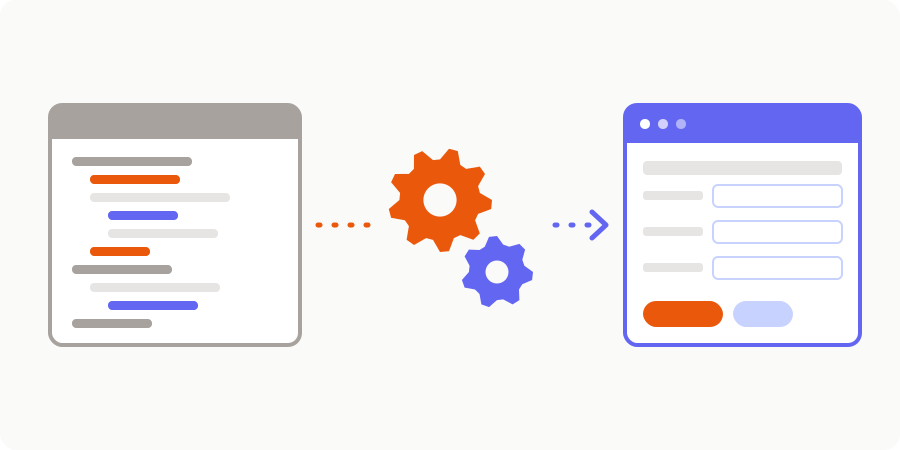
Moving the data is something most people grasp fairly quickly. But what about everything else? The hundreds of scripts written over the years, the buttons that calculate a price, the triggers that validate an entry, the script that runs on the server every night, the print layouts for quotes… That is where the real value of your FileMaker application lies: the way you work, turned into rules. And it is often what worries business owners most when they consider a migration.
Let's be clear from the outset: FileMaker scripts do not convert automatically into web code, and that is a good thing. What is preserved is the business logic. It is inventoried, documented, sorted, then rewritten cleanly in the new application, with tests that guarantee it produces the same results. Here is how.
In short
- No business rule is lost: every script is inventoried and classified (keep, simplify, drop).
- A large share of scripts only exist to navigate between layouts: they disappear naturally in a web application.
- Important rules become server-side code, covered by automated tests.
- Layouts are not copied: web screens are redesigned around how people actually work.
Read before rewriting: the script inventory
The first step is to know exactly what your database contains. FileMaker offers two valuable tools for this:
- the Database Design Report (DDR), which produces an HTML or XML report describing tables, fields, relationships, layouts and scripts;
- the Save a Copy as XML feature, available since FileMaker Pro 18, which exports a complete XML representation of the schema, layouts and scripts. It requires full access privileges.
These exports are the raw material of the audit. This is where AI makes a real difference: within hours, it reads hundreds of scripts, summarises what each one does, and maps the calls between scripts, the fields they use and the dead code. What used to take days of tedious reading becomes clear, navigable documentation. AI does not make the decisions, though: every summary is reviewed, and ambiguous rules are discussed with the people who use the application.
Keep, simplify, drop
Once the inventory is done, each script falls into one of three categories.
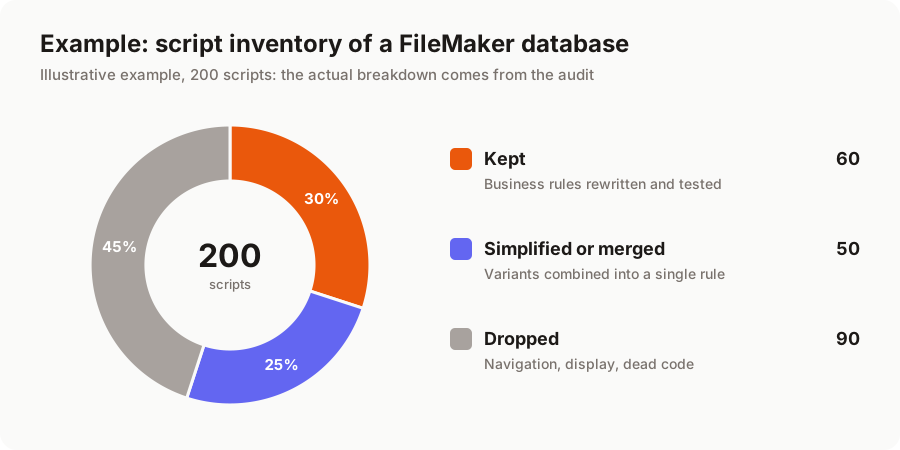
Keep: scripts that carry a genuine business rule. Calculating a price from the customer discount and quantity, numbering invoices, checking stock before an order is confirmed, generating a payment schedule. These are what give the application its value. They are rewritten faithfully.
Simplify or merge: scripts that do the same thing with minor variations ("Print quote", "Print quote v2", "Print quote export customer"), or long workaround sequences written to get around a FileMaker limitation. A single, clear, configurable rule replaces them.
Drop: navigation scripts (go to a layout, sort, return to the list), display scripts, one-off jobs run once ten years ago, imports from software that no longer exists. In a web application, navigation is handled by the interface itself: these scripts simply have no reason to exist any more.
This breakdown often comes as a pleasant surprise: the mass of "code" that seemed daunting at first actually contains a much smaller core of business rules.
From FileMaker to web application: how things map
Every FileMaker mechanism has an equivalent, often a more robust one, in a modern web application.
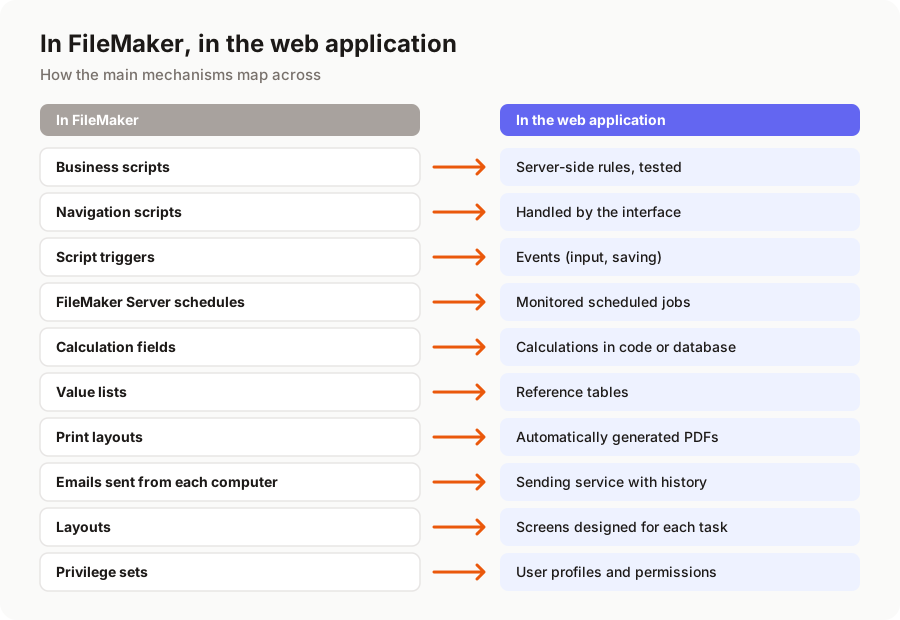
Business scripts become server-side rules
In FileMaker, a rule is often tied to a button: if someone edits the record another way, the rule does not apply. In the web application, business rules live on the server, in a single place. Whether an order is created from a screen, through an API or by an import, the same check applies. Every important rule is covered by automated tests, which we write from real cases taken from your database: same customer, same quantity, same discount, same result as before.
Workflows become explicit statuses
A quote that is accepted, then becomes an order, then a delivery, then an invoice: in FileMaker, this flow is often scattered across several scripts and fields. We model it as an explicit workflow, with statuses, transitions allowed by user profile, and a history of who did what and when.
Triggers become events
Script triggers (when a layout opens, when a record is committed, when a field is modified) become events in the application: input checks in the form, server-side validation when saving, automatic actions after a status change. The behaviour is the same, but it no longer depends on which screen you came through.
Scheduled server scripts become scheduled jobs
Script schedules on FileMaker Server (nightly reminders, imports, backups, statistics) become scheduled jobs on the application server, with monitoring: if one fails, an alert is sent, instead of a silence you only discover three weeks later.
Calculations, printing and emails
Calculation fields become calculations in the code or the database, verified against your real data. Print layouts (quotes, invoices, delivery notes) become automatically generated PDFs built from carefully designed templates in your branding. Emails, which in FileMaker often depend on the mail client installed on each computer, go through a professional sending service, with message templates and a record of what was sent.
Layouts become screens designed for real use
FileMaker screens are called layouts (modèles in the French version). Over time, a database often accumulates dozens or even hundreds of them: one for data entry, one for the list, one for printing, one for a particular user, another for the old format…
We do not reproduce them one by one. We start from your team's tasks: "handle a customer request", "prepare today's deliveries", "chase unpaid invoices". For each one, we design a screen that brings together everything the user needs, with instant search, filters, bulk actions, and an interface that also works on tablets and phones. Mockups are approved with you before development, as described in the 6 steps of a successful FileMaker migration.
Permissions follow the same logic: FileMaker privilege sets become user profiles (sales, accounting, management, field technician), which determine what each person can see and change, screen by screen and action by action.
This change of interface does take a little getting used to, admittedly. But users find their business bearings again, with fewer clicks, and training focuses on tasks rather than menus.
And the data behind it all?
Scripts and layouts do not exist without the data they handle. Calculation fields, global fields, value lists and container fields need special treatment during data migration; we cover that side in FileMaker data migration: how to move without losing anything.
As for the budget, the business logic hidden in scripts is the main source of uncertainty in a migration, and the main reason we always start with an audit. Price ranges are detailed in how much does a FileMaker to web migration cost.
In short
Your FileMaker scripts and layouts are not copied, they are understood. Every script is inventoried, documented with the help of AI, then kept, simplified or dropped. Business rules become tested server code, triggers become events, schedules become monitored jobs, print layouts become generated PDFs, and layouts become screens designed for real use. The way you work is preserved; it is the clutter that disappears.
Want to know what your database really contains? Our free audit of your FileMaker application includes an initial inventory of scripts and layouts. Explore our FileMaker migration service or tell us about your project.
A migration or business app project in mind?
Tell us about your context: we reply within 48 hours with a first recommendation, no strings attached.
Discuss your project