
FileMaker is reaching its limits: 7 signs it's time to migrate
Your FileMaker application was probably a great idea. Built ten or fifteen years ago, sometimes by an enthusiastic employee, it brought order to quotes, stock or customer follow-up far better than a pile of spreadsheets. It still works. But lately you can feel it straining: every new need turns into a workaround, every new hire into another licence.
How can you tell a passing annoyance from a tool that has genuinely hit its limits? Here are the seven signs we see most often among the business owners who get in touch with us. For each one: what you notice, why it happens, and what a custom web application would change.
In short
- One or two isolated signs do not justify a migration: FileMaker can remain a good tool.
- From three or four, it is worth pricing an alternative so you can compare.
- Beyond five, the tool is probably holding the business back, and every extra year costs you in licences, lost time and risk.
1. Remote or mobile access is a struggle
What you notice. A sales rep wants to check a customer record during a visit, a technician wants to log a job on site, a partner wants to follow the numbers from home. And it is awkward: VPN, slow connections, screens that are unreadable on a phone, or simply "we'll look when we're back at the office".
Why it happens. FileMaker was designed for desktop computers running FileMaker Pro. The FileMaker Go mobile app only exists for iPhone and iPad, not Android. There is browser access, FileMaker WebDirect, but it shows layouts designed for a computer screen and is poorly suited to small screens.
What you gain. A web application runs in any browser, on a computer, tablet or phone, Android and iPhone alike. Screens are designed for each format: logging a job in the field becomes a simple form you can fill in with one hand.
2. Only one person "knows the database"
What you notice. When something breaks, everyone turns to the same person: the employee who built the database, or a freelance developer who has maintained it for years. Their holidays are dreaded, and you would rather not think about them leaving.
Why it happens. A FileMaker database grows bit by bit, usually without documentation. Business rules hide in scripts, calculations and triggers that only their author can read. And FileMaker developers are much harder to find than web developers.
What you gain. A migration project forces those rules out into the open and gets them documented. The result runs on standard web technologies that plenty of developers know, and the code belongs to you. You no longer depend on a single person.
3. Everything slows down when several people log in
What you notice. At 9am, when the whole team logs in, lists take ages to load. Some reports are run "in the evening so they don't get in anyone's way". Remotely, it is even worse.
Why it happens. There are usually several causes: unstored calculation fields, chains of relationships, scripts looping through thousands of records, an ageing server. The FileMaker client exchanges a lot of data with the server, which makes it sensitive to network quality.
What you gain. A well-designed web application lets the server do the work and only sends the browser what is on screen. Heavy processing runs in the background. The number of simultaneous users stops being an issue.
4. Links with your other tools are patched together
What you notice. At the end of every month, someone exports a file for the accountant, tidies it up in Excel, then imports it somewhere else. Orders from the online shop are typed in by hand. Copy errors are part of daily life.
Why it happens. FileMaker can talk to other software (Data API, ODBC, Claris Connect), but these connections need specific development that many databases never received. Over time, manual import and export became the norm.
What you gain. A modern web application is built around APIs. It connects to your accounting software, your CRM, your online shop or a carrier's API, and data flows on its own. Hours of re-keying disappear, and the errors with them.
5. The licence bill grows with every new hire
What you notice. Every new user adds a line to the Claris invoice, and the annual renewal has become a real budget item. You sometimes hesitate to give someone access just for occasional look-ups.
Why it happens. FileMaker is sold as a subscription, per user per year. Depending on the plan, expect roughly €200 to €500 (excl. VAT) per user per year, plus the server, its hosting and maintenance. For 30 users, the total easily reaches €20k a year. We break this down in our article on the real cost of FileMaker licences.
What you gain. A custom application has no per-seat licence. You pay for the project once, then for hosting and maintenance: around €4k a year for 30 users. Adding a user costs nothing.
6. You need to open the tool to customers or partners
What you notice. Your customers would like to track their orders online, your subcontractors to upload their documents, your sales agents to check their figures. Today, everything goes through emails and PDF exports.
Why it happens. With a per-user licence model, opening the database to dozens or hundreds of outside people quickly gets expensive, and the FileMaker interface was never designed for occasional users who have had no training.
What you gain. A customer or partner portal is a natural part of a web application: everyone logs in with their own account, only sees their own data, and adding access does not mean buying a licence. For some businesses, the portal even becomes a selling point.
7. Backups, security, GDPR: you are not confident
What you notice. You are not quite sure where the backups are, or whether anyone has ever tried restoring one. The server sits in a cupboard. Access rights boil down to "everyone sees everything". And a customer's question about how their data is protected makes you uneasy.
Why it happens. FileMaker Server offers scheduled backups and encryption, but they still have to be configured, monitored and tested. In many SMEs, the server was set up once and has barely been looked at since.
What you gain. The migration is a chance to reset everything: hosting in Europe, automatic and tested backups, role-based access rights, a change history, regular security updates. You can answer your customers and meet your GDPR obligations.
Run your own self-assessment
How many of these situations do you recognise in your business? Be honest, and ask the people who use the tool every day: they often see irritations that management no longer notices.
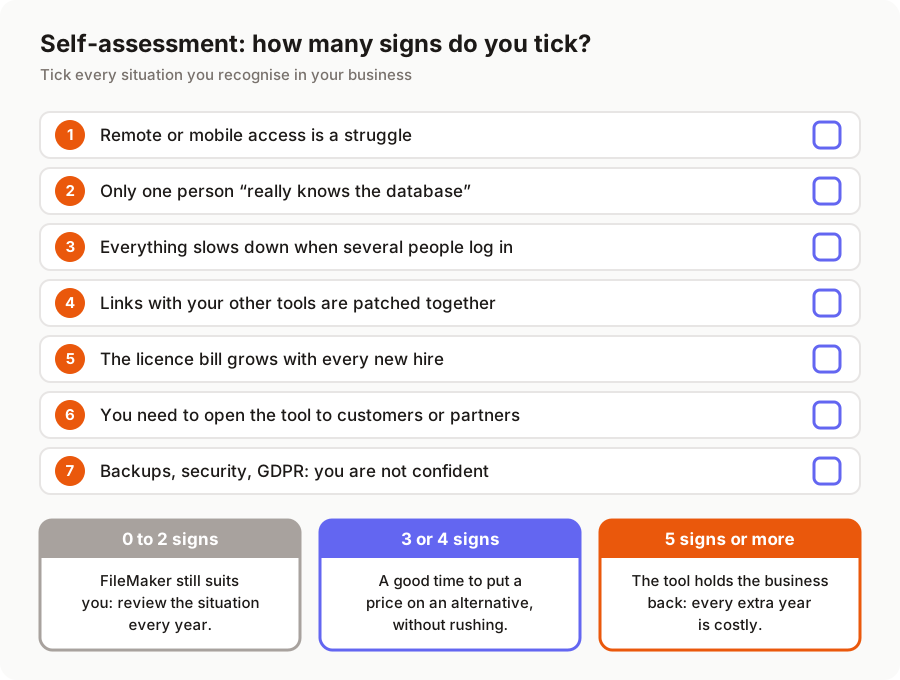
0 to 2 signs. FileMaker is still serving you well, and there is no reason to migrate on principle. A well-kept database used by a small office-based team can last for years. Just review the situation once a year.
3 or 4 signs. This is the right time to compare, without any rush. Get an alternative priced and set it against what FileMaker costs you every year. Our honest comparison of FileMaker and a custom web application will help you weigh up both options.
5 signs or more. The tool is probably holding your business back: lost time, re-keying, missed opportunities, risk to your data. The longer you wait, the bigger the database grows and the longer the migration will take.
What actually changes
Behind these seven signs there is often a single cause: an architecture designed for office desktops, now used by mobile teams who are connected to other tools and open to the outside world.
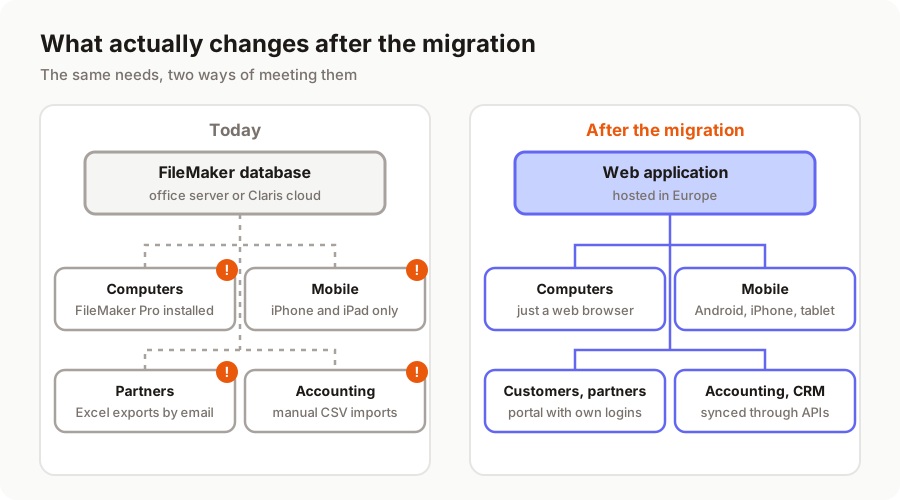
Migrating does not mean throwing everything away. Your data is carried over, your business rules are kept (and often simplified), and your teams find their bearings quickly. With AI-assisted development, timelines and budgets have dropped sharply: expect €5k to €12k for a small application and €12k to €30k for a business application. The details are in our article how much does a FileMaker to web migration cost?.
What next?
If you ticked several signs, the best next step is to have your database assessed. We offer a free audit of your FileMaker application: we analyse its structure, scripts and usage, then give you a quote and a migration plan, including when our conclusion is that you are better off keeping FileMaker for now.
Discover our FileMaker migration service or tell us about your project.
A migration or business app project in mind?
Tell us about your context: we reply within 48 hours with a first recommendation, no strings attached.
Discuss your project